With my apache + java hat, I tried to renew the IIS certificate that was going to be expired in a few days. Since I have to purchase the new certificate, I notified this to the IT and got the new certificate (pfx file).
1. Go to IIS manager -> server certificates
2. Import the new certificate file by giving the location of the pfx file and the password.
3. Go to the website in the IIS manager
4. Select Bindings from the right pane.
5. Click on edit on the correct host name
6. Make sure it points to the correct certificate.
My database resides in a separate server, and I did the same. I also enabled automatic rebinding of the renewed certificate in both servers.
After 2 days, my older certificate expired and when I tried to access my application, it gives a ERR_CERT_DATE_INVALID error.
I thought this was because I still had my older certificate, so I removed this from the IIS server.
When I selected the certificate under the Not Secure option next to the URL in the browser, I found that it was still pointing to the older certificate.
Then I checked the certificate store which is in the web hosting. It has the correct certificate, and the older certificate is actually deleted – which is correct.
After doing some browsing, I found out a website \’https://www.digicert.com/help/\’, to check on my website, as it can be accessed by public. It also showed that it was pointing to the older one which was expired.
Then I went to CMD, and typed in netsh http show sslcert ipport=:
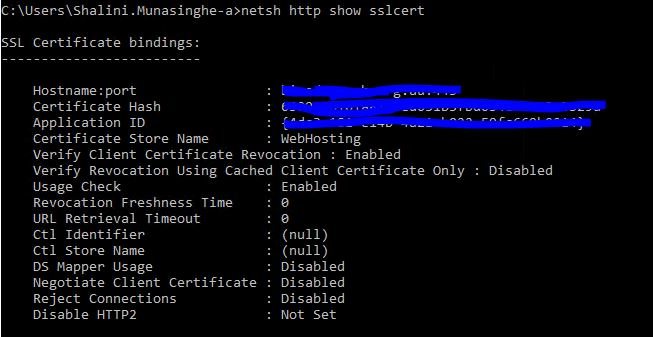
When I compared the certificate hash above with what could be seen in the certificates in IIS, it was different. Also this older certificate was bound to the IP instead of the domain. So I deleted this from CMD using netsh http delete sslcert ipport=:
When I executed netsh http show sslcert, it was pointing to the correct certificate with the domain and the port.
The issue here is, SSL is associated to a domain name instead of an IP address. Initially this would not be an issue. However, when I imported a new certificate, I still had my older certificate.
So the problem arises when you work with multiple SSL certificates inside a single IIS server. Although you deleted the older certificate from the IIS manager, this might not still work and the server will still keep pointing to the older one, in which case you will have to manually get rid of using the netsh.

 Shalini's Knowledge Share
Leave a comment