Another assignment given in my BI training was to design and build a warehouse for an order processing system, which included transferring data from excel sheets to a fact table.
As I have done most of the tasks in previous projects related to BI, like designing a star schema, creating the relevant packages, this was another similar task. The design below explains the star schema.
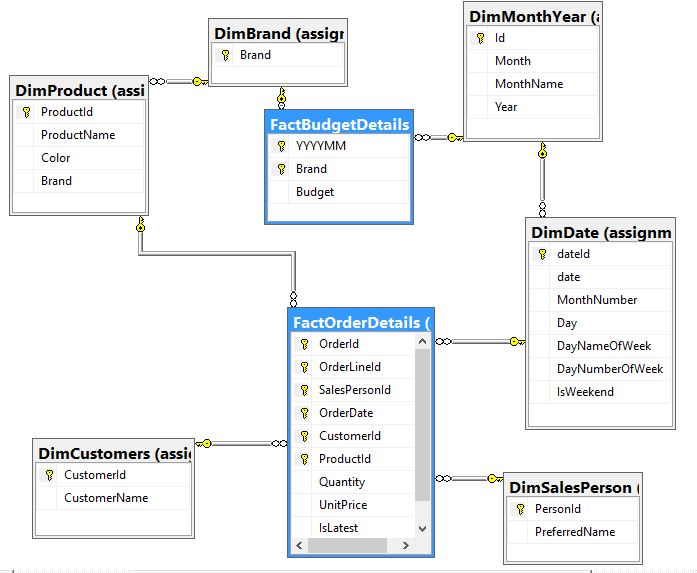
The reason I thought of writing this was, I faced many issues when creating the package to transfer data from a series of excel sheets to the fact table. After turning the internet upside down, I was able to finally complete the assignment.
I used Visual studio 2015 SSIS for development.
1. There were 4 excel files with the name Budget_2013.xlsx, Budget_2014.xlsx till 2016.
In each file, there is a sheet for each month with the name of the month (example: January, February…)
In each sheet, contained 2 columns, for Brand and Budgeted Value.
2. I eventually came up with the following variable as I developed. Ideally they should have been done as the first step.
IsValidSheetName – boolean value to identify if it is a valid sheet name
VarFilePath – Path of the excel file
VarFilePattern – to have the naming convensions; Budget_*.xlsx
VarFolderPath – path of the folder containing the excel files
VarSheetName – Name of the sheet. By default September$ was given. Initially January$ was given which failed, as when the loop tried to pick September$, it failed as the length of the field was automatically set to the length of the string \’January$\’ which is less than \’September$\’.
Year – an expression was assigned to get the year from the name of the file; (DT_I4) SUBSTRING( @[User::VarFilePath] , 37, 4).
3. Created 2 connections as follows:
– Excel Connection Manager to connect to the excel sheets. Assigned the 2013 sheet as the default.
– OLE DB Connection – to connect to the data warehouse
4. Since it is needed to iterate among each file, and then among each sheet, I used 2 foreach loops.
5. First foreach, iterated along the files. It was pretty simple. The file name was given \’Budget_*.xlsx\’.
Under variable mappings, the created VarFilePath was assigned with Index 0.
6. Second foreach, iterates along the sheets; the area I was faced with a lot of issues:
The enumerator to use is \’Foreach ADO.NET Schema Rowset Enumerator\’
ISSUE 1: Could not set the connections. The connections area did not give any options to set the connections.
RESOLUTION: Deployment target version of the project should be set to \’SQL Server 2016\’. It was set to \’SQL Server vNext\’.
Thereafter, create a new connection \’Microsoft Access 15.0 Access Database Engine OLE DB Provider\’ under .NET Provider for oleDb was created.
Assign the Budget_2013.xlsx file
Under All tab, assign \’Excel 12.0\’ for Extended properties.
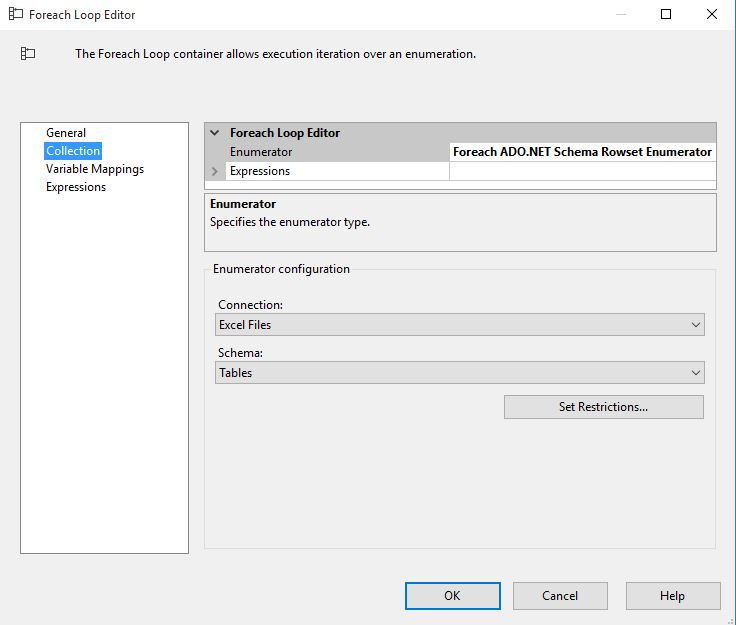
Once the connection is created in the foreach loop, add the VarSheetName under variable mappings tab with Index 2.
7. Inside the loop, I added a script task to identify if it is a valid sheet name and if not to throw an error message.
8. Added a data flow task.
9. Inside the data flow, I had the following:
Excel Source: Points to the created Excel Connection Manager.
Set the data access mode to Table name or view name variable.
Under variable name, assigned VarSheetName user variable.
Derived column: Had 3 columns
Year – Assigned the user variable year.
Month – derived the name of the month from the variable VarSheetName; REPLACE(@[User::VarSheetName],\”$\”,\”\”)
YYYYMM – as this is a primary key in the fact table. Assigned the user variable year for the moment
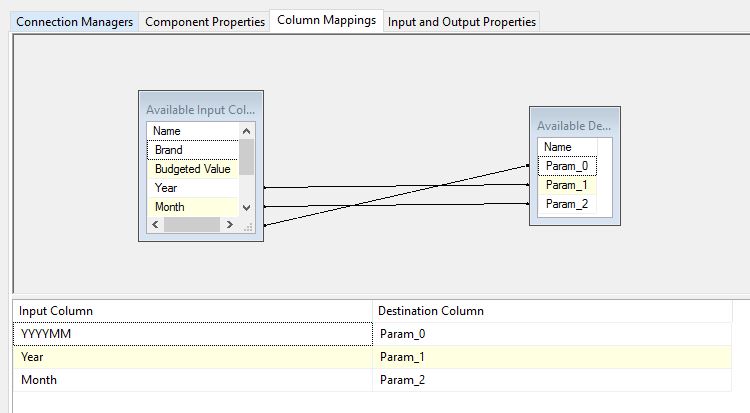
OLE DB Command: The primary key column YYYYMM has to be derived using the month name and the year.
Be sure to assign the proper connection manager
Used the following sqlCommand:
SELECT ?=ID FROM [MyDB].[assignment03].[DimMonthYear] where Year = ? and MonthName = ?
Column mappings – Assigned derived year and month from the derived columns for the inputs and the output was assigned to YYYYMM
OLE DB Destination: maps the output columns to the fact table.
10. Finally tried to run the above, failed failed failed with the following error:
Error: 0xC0014023 at Loop Sheets: The GetEnumerator method of the ForEach Enumerator has failed with error 0x80131509 \”(null)\”. This occurs when the ForEach Enumerator cannot enumerate.
Warning: 0x80019002 at Loop Files: SSIS Warning Code DTS_W_MAXIMUMERRORCOUNTREACHED. The Execution method succeeded, but the number of errors raised (2) reached the maximum allowed (1); resulting in failure. This occurs when the number of errors reaches the number specified in MaximumErrorCount. Change the MaximumErrorCount or fix the errors.
Warning: 0x80019002 at FactBudgetDetails: SSIS Warning Code DTS_W_MAXIMUMERRORCOUNTREACHED. The Execution method succeeded, but the number of errors raised (2) reached the maximum allowed (1); resulting in failure. This occurs when the number of errors reaches the number specified in MaximumErrorCount. Change the MaximumErrorCount or fix the errors.
RESOLUTION:
Open solution explorer. Project->Properties->Debugging->Run64BitRunTime = TRUE(Change it to FALSE)->Click OK.
Mostly, it was due to environmental issues that somehow I spent a few days trying to resolve these problems.

 Shalini's Knowledge Share
Leave a comment